v0.15.0
These release notes are also available on the Arroyo Blog
This release contains many improvements and fixes from running Arroyo at scale to power Cloudflare Pipelines. There are also some exciting new features, in particular complete support for writing Apache Iceberg tables.
Arroyo is a community project, and we're greatful to all of our contributors. We particularly want to welcome those who made their first contributions in this release:
- @Vinamra7 made their first contribution in #870
- @meirdev made their first contribution in #880
- @pancernik made their first contribution in #885
- @cmackenzie1 made their first contribution in #895
- @janekhaertter made their first contribution in #901
- @hhoughgg made their first contribution in #898
- @askvinni made their first contribution in #923
- @migsk made their first contribution in #962
Features
Iceberg
New in Arroyo 0.15 is the ability to write to Apache Iceberg tables via the new Iceberg Sink. Iceberg is a table format, which provides database-like semantics on top of data files stored in object storage.
The Iceberg Sink builds on our existing FileSystem Sink, which is uniquely capable of writing large Parquet files (supporting efficient querying) to object storage, exactly-once, while still maintaining frequent checkpoints.
On top of the existing Parquet-writing infrastructure, the Iceberg Sink adds a two-phase commit protocol for committing to Iceberg tables, extending exactly-once semantics to the catalog.
Iceberg support is launching with support for most REST catalogs including S3 Tables, Snowflake Polaris, Lakekeeper, and of course R2 Data Catalog, Cloudflare's managed Iceberg Catalog built on R2 Object Storage.
What does this look like? Here's an example of a query that will write to an R2 Data Catalog table:
create table impulse with (
    connector = 'impulse',
    event_rate = 100
);

create table sink (
    id INT,
    ts TIMESTAMP(6) NOT NULL,
    count INT
) with (
    connector = 'iceberg',
    'catalog.type' = 'rest',
    'catalog.rest.url' = 'https://catalog.cloudflarestorage.com/bddda7b15979aaad1875d7a1643c463a/my-bucket',
    'catalog.warehouse' = 'bddda7b15979aaad1875d7a1643c463a_my-bucket',
    type = 'sink',
    table_name = 'events',
    format = 'parquet',
    'rolling_policy.interval' = interval '30 seconds'
) PARTITIONED BY (
    bucket(id, 4),
    hour(ts)
);

insert into sink
select subtask_index, row_time(), counter
from impulse;
This example also demonstrates the new PARTITIONED BY syntax for expressing partitioning schemas for Iceberg tables. We support all Iceberg partition transforms like day, hour, bucket, and truncate.
See the Iceberg sink docs for full details on how to use it.
- Iceberg sink by @mwylde in #929
- Don't write out partition path for iceberg by @mwylde in #939
- Reduce iceberg commit overhead by @mwylde in #942
- Fixes for writing Iceberg data with deeply nested arrays and structs by @mwylde in #947
- Iceberg partitioning by @mwylde in #957
Improved Checkpoint Details
Arroyo checkpoints its state periodically in order to achieve fault tolerance. That is to say: crashing shouldn't cause us to lose data (or, when using transactional sources and sinks, to duplicate data).
Checkpointing in a distributed dataflow system is complicated. We use a variation of an algorithm designed back in the 80s by distributed systems GOAT Leslie Lamport, called Chandy-Lamport snapshots.
We've previously written in more detail about how this works, but the gist is: we need to propagate a checkpointing signal through the dataflow graph, each operator needs to respond to it by performing several steps and ultimately uploading its state to object storage, then we need to write some global metadata and possibly perform two-phase commit.
Any of these steps can encounter issues or performance problems, and it's often useful to be able to dig into the timings of individual steps to diagnose overall slow checkpointing.
We've long had some basic tools in the Web UI for this, but in 0.15 we've made them much better. It looks like this:
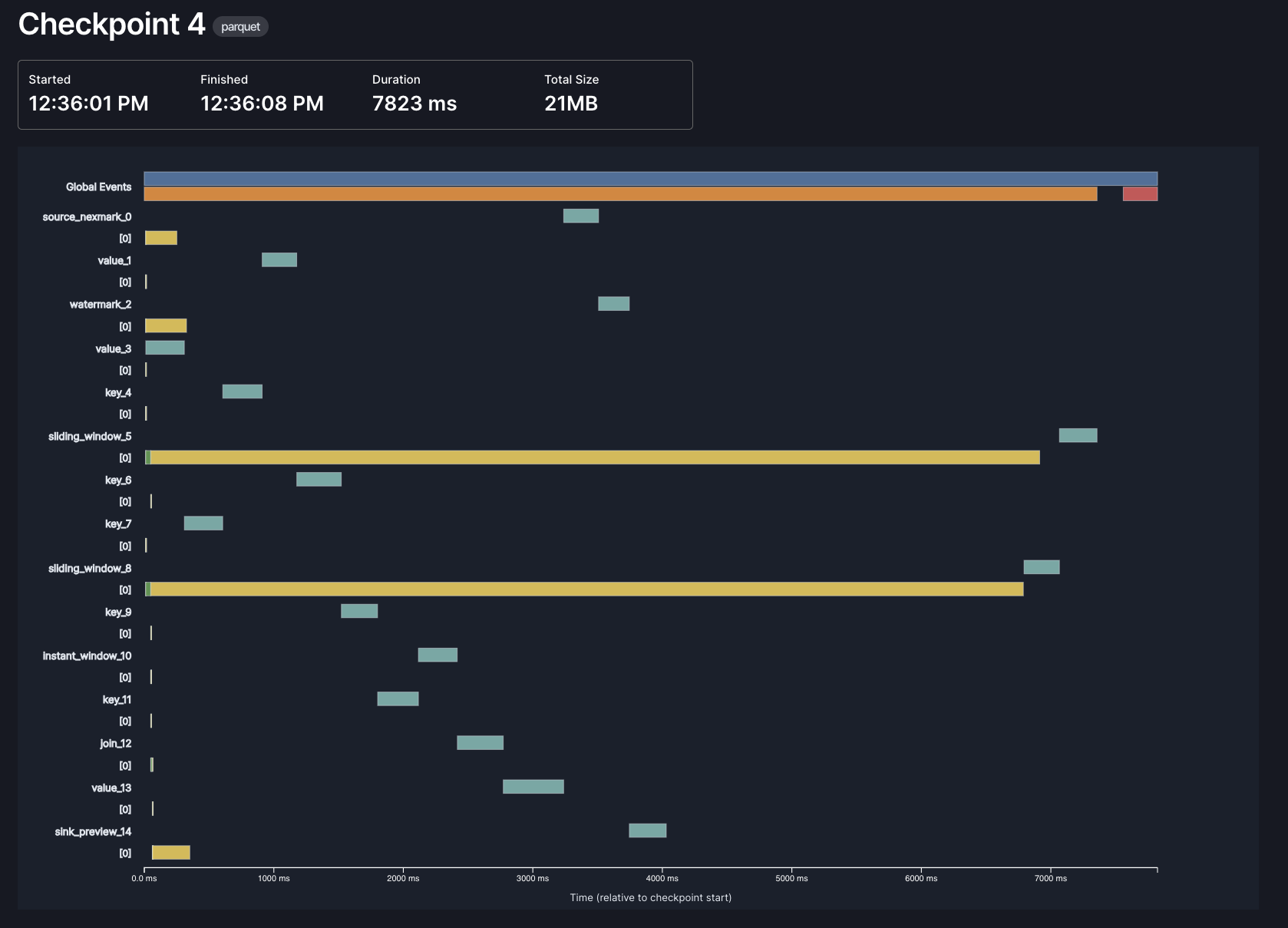
Each bar represents a different phase of checkpointing, in one of three contexts: global, per-operator, and per-subtask. In this example, most of the time in checkpointing is spent by the async phase of our window operators (the long yellow lines), which makes sense: those are the operators that need to store the most state, and the async phase is when we actually upload data to object storage.
Thanks to @hhough who contributed significantly towards this effort!
- Better understand checkpoint timing by @hhoughgg in #898
- Better checkpoint metrics by @mwylde in #941
- Improve checkpoint timing metrics by @mwylde in #903
SQL
We've made several improvements to our SQL support in Arroyo 0.15.0.
New functions
We've upgraded our SQL expression engine to DataFusion 48, which brings along a number of new SQL functions:
- greatest
- least
- overlay
- array_max / list_max
- array_overlap
- array_any_value
- array_has_all
- array_has_any
- array_intersect
- array_max
- array_ndims
- array_pop_back
- array_pop_front
- array_prepend
- array_remove_all
- array_remove_n
- array_replace
- array_replace_all
- array_slice
- union_extract
- union_tag
row_time
In addition to the new standard SQL functions, we've added a special new row_time function which returns the event time of the current row. This can be particularly useful when used as a partitioning key, as can be seen in the previous Iceberg partitioning example.
Thanks @RatulDawar for this great contribution!
- Add row_time UDF by @RatulDawar in #858
Decimal Type
We've added support for the Decimal SQL type in 0.15, backed by the Decimal128 Arrow type. You can now use precise, fixed-point arithmetic in your SQL queries, useful for financial, scientific, or other use cases requiring exact numeric accuracy.
A Decimal type is defined like this:
CREATE TABLE ORDERS (
  PRICE DECIMAL(precision, scale),
  ...
)
It takes two arguments:
- precision is the total number of significant digits (both before and after the decimal point)
- scale is the number of digits after the decimal point
For example, DECIMAL(10, 2) supports values like 12345678.90, while DECIMAL(5, 3) supports values like 12.345.
We've also added support for serializing DECIMAL into JSON in several formats, which can be configured via the json.decimal_encoding option:
number: JSON number, which may lose precision depending on the JSON library that's consuming the valuestring: renders as a full-precision string representationbytes: encodes as a two's-complement, big-endian unscaled integer binary array, as base64
Note that due to SQL's promotion rules, certain calculations (like those involving BIGINT UNSIGNED and BIGINT) may unexpectedly produce values as DECIMAL, as that may be the only way to fully represent the result.
Cloudflare R2 support
This release has added complete support for Cloudflare R2 object storage, for both checkpoints and in the FileSystem sink.
R2 can be configured in any part of the system that takes object-store paths, via a new URL scheme:
r2://{account_id}@{bucket_name}/{prefix}
or via an endpoint URL:
https://{bucket}.{account_id}.{jurisdiction}.r2.cloudflarestorage.com/{path}
Why did this require custom work? R2 is generally S3 compatible, but there are a few differences with implications for systems using the low-level multipart upload API, as we do in the FileSystemSink. In particular, R2 requires that all parts of a multipart upload be the same size, except for the last part, which may be smaller.
See the storage docs for more details.
- Add native support for Cloudflare R2 by @mwylde in #886
- Ensure all non-final multipart uploads in filesystem sink are the same size by @mwylde in #889
- Fix R2_VIRTUAL regex by @cmackenzie1 in #925
- Ensure that all parts of multipart uploads are the same size even after recovery by @mwylde in #954
- Ensure final part of a multipart upload is always smaller than earlier parts by @mwylde in #960
TLS & IPv6
TLS and authentication—including mTLS—is now supported across all Arroyo services. This allows you to securely run a cluster on a public network. Additionally, all services now support running over IPv6 networks.
Enabling TLS on Arroyo's various HTTP and gRPC endpoints is easy, via configuration:
[tls]
enabled = true
cert-file = '/tls/server.crt'
key-file = '/tls/server.key'
You can use a public cert, or generate a self-signed cert, like this:
# 1. Generate CA private key and self-signed cert
$ openssl genrsa -out ca.key 4096               # CA private key
$ openssl req -x509 -new -key ca.key -sha256 -days 3650 -out ca.crt -subj "/CN=Test Root CA"  # CA cert

# 2. Generate localhost key and CSR
$ openssl genrsa -out server.key 4096           # server private key
$ openssl req -new -key server.key -out server.csr -subj "/CN=localhost"  # CSR for localhost

# 3. Sign server cert with CA
$ openssl x509 -req -in server.csr -CA ca.crt -CAkey ca.key -CAcreateserial -out server.crt -days 365 -sha256
To use mTLS authentication (which allows two nodes in the cluster to mutually authenticate that they are each who they say they are), you can additionally set a mTLS CA (certificate authority) with
[tls]
mtls-ca-file = '/tls/ca.key'
Alternatively, we also now support token-based authentication for the API server, like this:
[api.auth_mode]
type = 'static-api-key'
api-key = 'mysecretkey'
Like all Arroyo configuration, this can be specified either via a config file or via environment variables.
See the TLS docs for more.
- Add TLS support for all services by @mwylde in #899
- mTLS and key-based authentication by @mwylde in #908
- Add support for ipv6 networking by @mwylde in #883
Fixes
- Fix: Support
Vec<&str>args in UDAFs by @Vinamra7 in #870 - Fix broken UI metrics due to multiple prometheus crate versions by @mwylde in #882
- Update Datafusion sha to 987c06a5 to pull in fix to encoding by @mwylde in #884
- Fix regression that caused all sink inputs to be shuffled by @mwylde in #890
- Fix race condition in control loop that could cause pipeline starts to be ignored by @mwylde in #892
Improvements
- Switch to Github action runners by @mwylde in #863
- Update dependencies for 0.15.0 by @mwylde in #867
- Support binding worker address to loopback for local dev by @mwylde in #869
- Improve the error message when writing to a non-updating format by @mwylde in #874
- Add support to length delimited protobuf messages by @meirdev in #880