v2.5.0
🛡️ Distributed Cache Stampede Protection
Since the very beginning FusionCache offered a solid Cache Stampede protection, as explained in the docs where it is clearly illustrated:
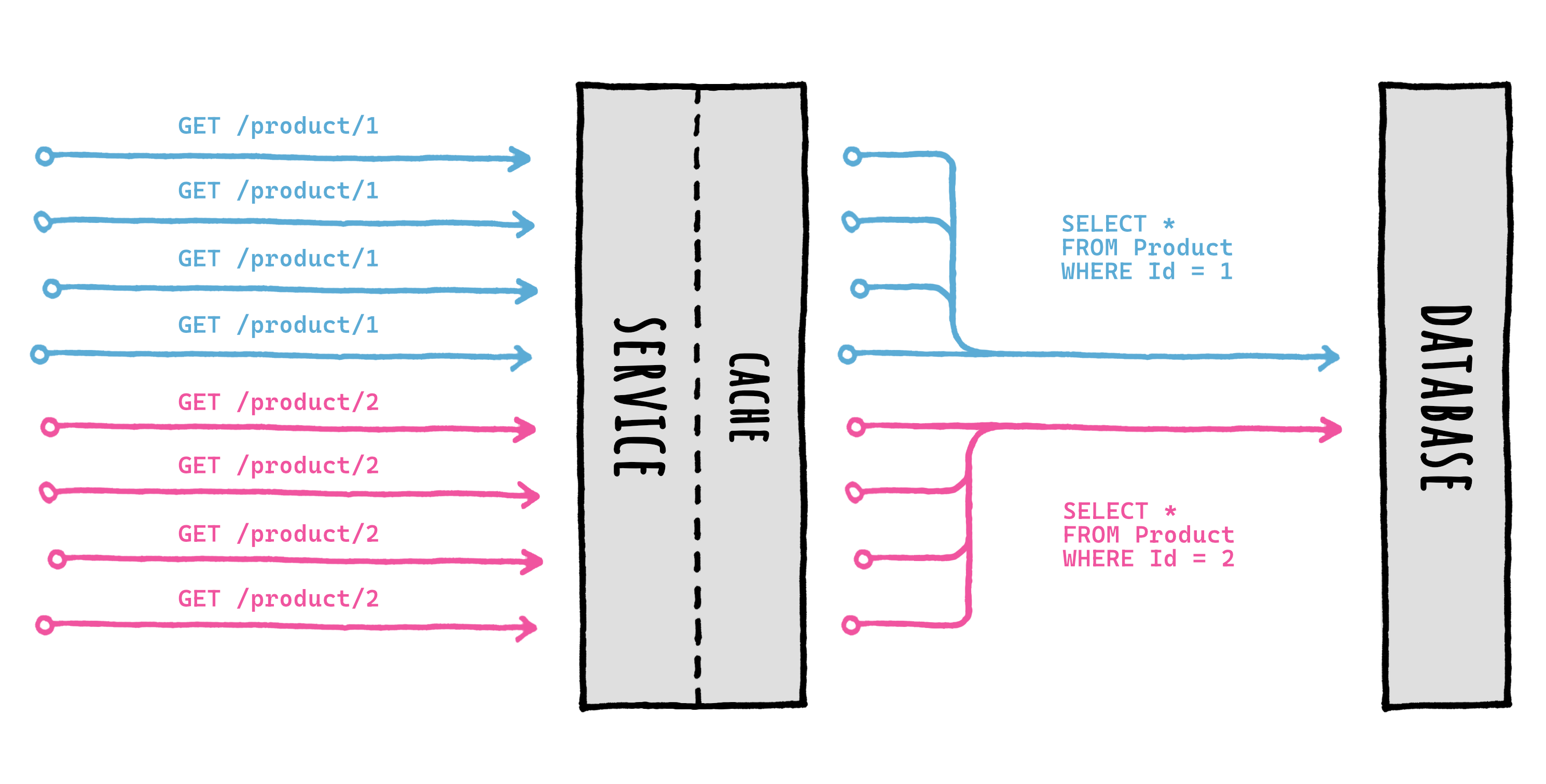
Such protection worked not just in the normal flow (miss -> factory -> return) but also with other more advanced features like:
- Eager Refresh: hit (after the eager threshold) -> return + background factory
- Factory Timeouts: miss -> factory + timeout -> return + background complete
With time the stampede protection got even better, and even extensible: this allowed 3rd party implementations of the core mechanism, called memory locker (IFusionCacheMemoryLocker).
All of this without removing the normal "it just works" experience since, by default, a StandardMemoryLocker is used without needing any user setup or intervention.
Cool.
But here's the thing: this protection had always been a local thing, meaning it did not span multiple nodes, in a distributed way: this meant that, if we were "unlucky", multiple factories could have run at the same time for the same cache key on different nodes.
Meaning, this:
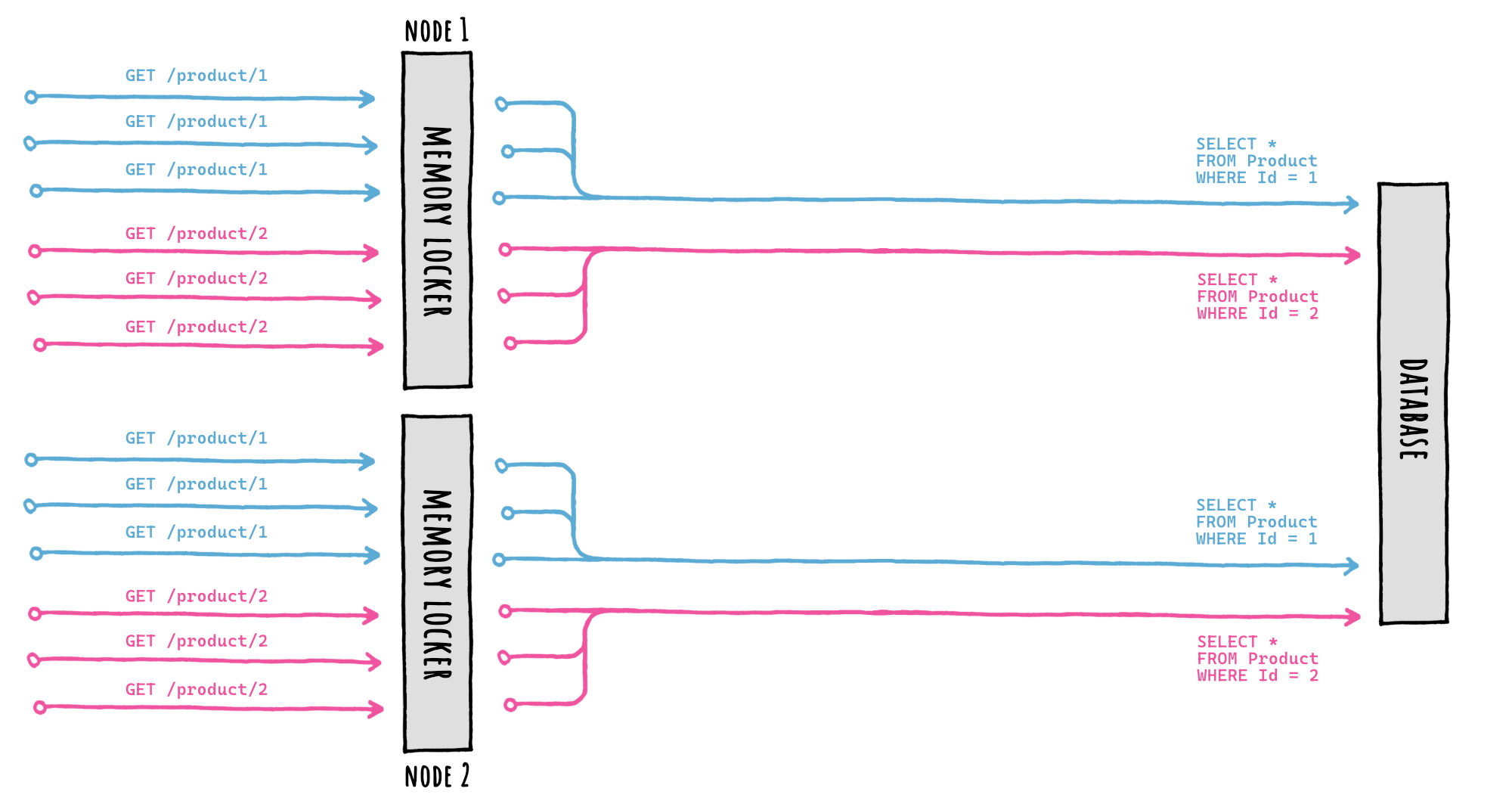
But that was true until now: enter Distributed Cache Stampede Protection 🎉
Thanks to the introduction of the new IFusionCacheDistributedLocker (see the next point) it's now possible to coordinate factory execution accross multiple nodes, so that only one factory would run at the same time for the same cache key even on different nodes.
Meaning, this:
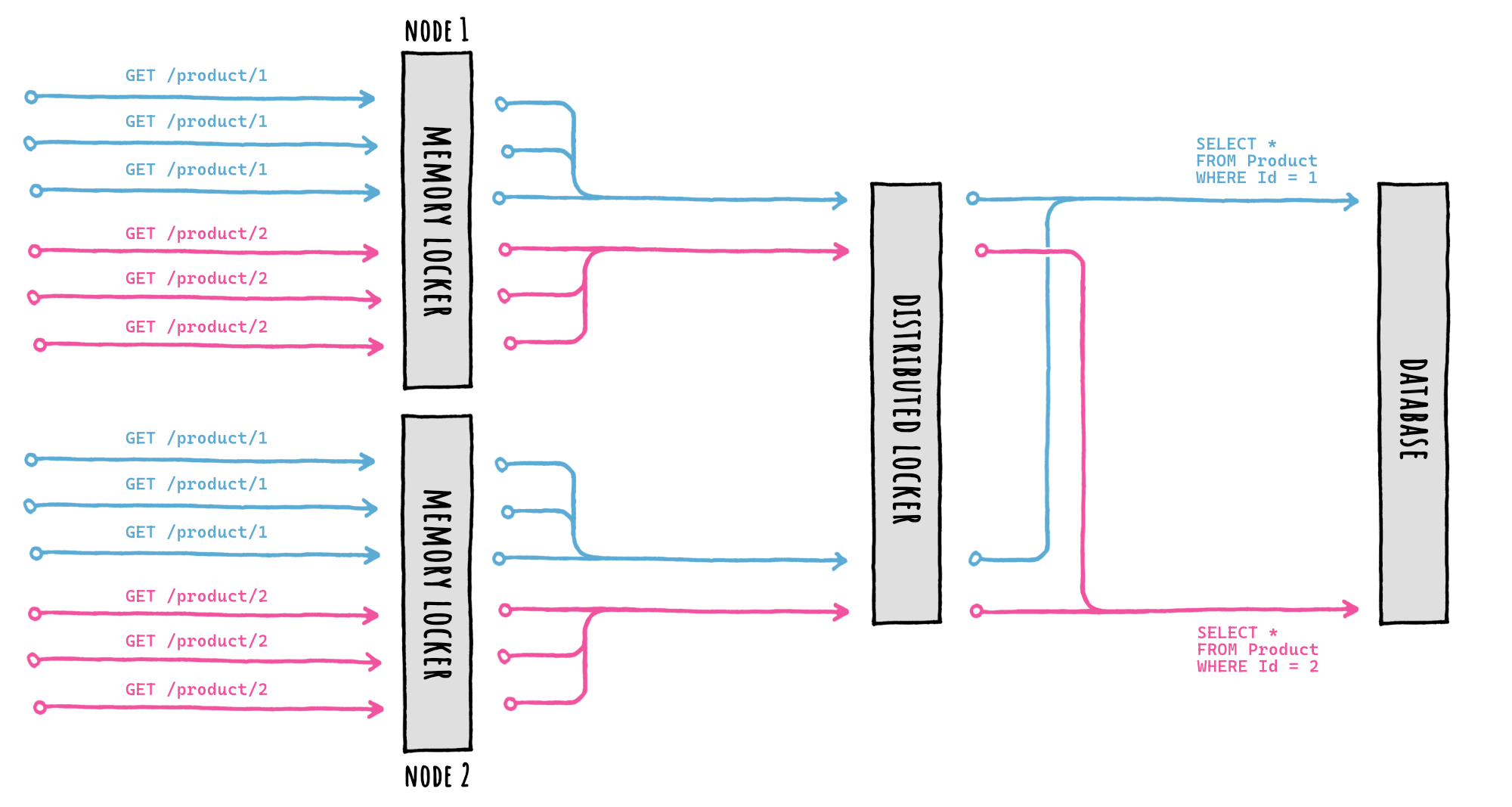
By providing an IFusionCacheDistributedLocker implementation during setup, FusionCache will take care of everything, we don't have to do anything else.
The setup looks like this:
services.AddFusionCache()
	// SERIALIZER
	.WithSerializer(
		new FusionCacheSystemTextJsonSerializer()
	)
	// DISTRIBUTED CACHE
	.WithDistributedCache(
		new RedisCache(new RedisCacheOptions
		{
			Configuration = "localhost:6379",
		})
	)
	// BACKPLANE
	.WithBackplane(
		new RedisBackplane(new RedisBackplaneOptions
		{
			Configuration = "localhost:6379",
		})
	)
	// DISTRIBUTED LOCKER <-- HERE IT IS!
	.WithDistributedLocker(
		new RedisDistributedLocker(new RedisDistributedLockerOptions
		{
			Configuration = "localhost:6379",
		})
	);
Or, even better, if we want to re-use the same connection multiplexer for better performanceand use of resources, we can do this:
var muxer = ConnectionMultiplexer.Connect("localhost:6379");

services.AddFusionCache()
	// SERIALIZER
	.WithSerializer(
		new FusionCacheSystemTextJsonSerializer()
	)
	// DISTRIBUTED CACHE
	.WithDistributedCache(
		new RedisCache(new RedisCacheOptions
		{
			ConnectionMultiplexerFactory = async () => muxer,
		})
	)
	// BACKPLANE
	.WithBackplane(
		new RedisBackplane(new RedisBackplaneOptions
		{
			ConnectionMultiplexerFactory = async () => muxer,
		})
	)
	// DISTRIBUTED LOCKER <-- HERE IT IS!
	.WithDistributedLocker(
		new RedisDistributedLocker(new RedisDistributedLockerOptions
		{
			ConnectionMultiplexerFactory = async () => muxer,
		})
	);
As always, the idea is that "it just works".
See here for the original issue.
🔒 Extensible Distributed Locking
As mentioned above, this is the new distributed component responsible for coordinating multiple factory executions on different nodes, all automatically.
As of now I'm providing 2 main implementations:
- 📦 ZiggyCreatures.FusionCache.Locking.Distributed.Memory (for local testing)
- 📦 ZiggyCreatures.FusionCache.Locking.Distributed.Redis (for production use)
Of course the Redis one is the only real deal for now, meant for production use.
Other implementations in the future will be possible, by simply implementing the new IFusionCacheDistributedLocker abstraction, just like it was possible before with the IFusionCacheMemoryLocker abstraction.
So to recap:
- install the package (e.g.: the Redis one)
- add 1 line in the setup (just like for the distributed cache or the backplane)
- done
I would say it's all pretty nice 🙂
See here for the original issue.
⚙️ New MemoryCacheDuration entry option
This is seemingly small, but really important.
In a multi-node scenario with an L1+L2 setup it's important to keep the cache, as a whole, coherent.
When using a Backplane there's no need to do anything: all is taken care of, and the cache as a whole is always coherent.
But wha if we cannot or don't want to use a backplane, for... reasons?
Well, every change in the cache will leave the other L1s out-of-sync for the remaining time before their expiration, and this is not good.
This problem is known as Cache Coherence, and the backplane is what is used to SOLVE it. But if we can't use a backplane, we should at least MITIGATE it: and we can do that by reducing the incoherency window.
And how?
Well, by simply specifying 2 different durations: one for the L1 and one for the L2.
Now, with FusionCache it has always been possible to specify a different Duration for the distributed cache, thanks to the DistributedCacheDuration option.
The problem was that, when in the scenario above (L1+L2 and no backplane), it would have been nice to be able to simply say "keep all the durations as alrady specified, and just refresh the data in the L1 from L2 every few seconds".
But with only the DistributedCacheDuration option available, the way to achieve this was counterintuitive: instead of somehow override the L1 duration, we needed to lower the normal Duration to a few seconds and specify the intended logical duration as the DistributedCacheDuration.
Not terrible, but not great.
But now, not anymore: enter MemoryCacheDuration.
We can of course go granular on a call-by-call basis, but there's something better: we can simply specify a value in the DefaultEntryOptions, and all the existing call sites will inherit this new value which will automatically override the duration only for the L1.
Done.
And, if we use Tagging we can simply do the same thing for the TagsDefaultEntryOptions, and we're done.
Something like this:
services.AddFusionCache()
	.WithOptions(options =>
	{
		options.DefaultEntryOptions.MemoryCacheDuration = TimeSpan.FromSeconds(5);
		options.TagsDefaultEntryOptions.MemoryCacheDuration = TimeSpan.FromSeconds(5);
	});
Oh, and the new Best Practices Advisor (see next point) can already give this advice when it detects such a scenario.
Nice 🙂
[!IMPORTANT] It's important to say that, if you can, you should always use the backplane, as that is THE way to solve cache coherence for good without out-of-sync windows or other issues.
See here for the original issue.
🏅 Best Practices Advisor
Sometimes we may inadvertently fall into a scenario with:
- a particularly strange combination of options
- a particularly strange combination of components (distributed cache, backplane, etc)
- a particularly strange combination of... both
With time FusionCache got more and more new components (like #575 ) and options (like #571 ) and this, along with the naturally dynamic nature of a flexible setup and configuration, may lead to inadvertently make the wrong decisions and fall into some gotchas.
FusionCache already had a couple of internal checks, like looking for a missing CacheKeyPrefix when using a shared L1 (which may lead to cache key collisions), and warns about them in the logs.
Now this practice has been unified & expanded, and it has a name: Best Practices Advisor.
Long story short, FusionCache now checks for common pitfalls and can give warnings and suggestions, all automatically and based on the current runtime state: no need to scrape the docs to see if the current config may lead to surprises thanks to a bad incantation of options.
I'd like to highlight that I've been careful about not trying to make it too smart for its own good: that is an easy to miss cliff that would lead to exaggerate in the implemented heuristics and checks, leading to bad results.
The checks initially implemented are:
- missing cache key prefix: when using a named cache with an L2 or even just a shared L1, a missing cache key prefix may lead to cache key collisions
- backplane + no distributed cache: when using a backplane without a distributed cache, it's important to check the default value for sending automatic distributed notifications, to avoid a useless continuous refresh cycle
- distributed cache + no backplane + no memory cache duration: in this scenario it's probably better to use a lower memory cache duration to mitigate the cache coherence problem
- distributed locker + no distributed cache: without a distributed cache it does not make much sense to use a distributed locker
More checks will be added in the future, but for now these are already quite useful.
Oh, one final thing: if you are thinking "great, a new piece of AI crap that will waste resources" then... nah, it's just a bunch of ifs done automatically in the background during startup. And if you want you can disable the Advisor by simply setting the new EnableBestPracticesAdvisor option to false (default is true).
See here for the original issue.
⚙️ New IgnoreTimeoutsWhenDebugging option
Community user @tvardero asked if it was possible to automatically ignore all timeouts when debugging.
That was in fact an interesting feature request, and after some investigations I decided to proceed.
Now, when setting the new IgnoreTimeoutsWhenDebugging option to true, all timeouts will be ignored, but ONLY when there is a debugger attached (via Debugger.IsAttached).
All in all this will help when debugging issues locally, without nasty timeouts hitting simply because we are inspecting a variable after a breapoint hit, which is... the whole point of debugging, right?
Thanks @tvardero for the input!
See here for the original issue.
See here for the feature design issue.
🕑 Small timestamps change
Thanks to community user @vit-svoboda I changed the logic that gets the timestamp for a new entry, generated from a factory. Before, the timestamp was about the moment the factory ended, now it's when it started. No big change really, but it should help in a couple of edge cases with high concurrency.
See here for the original issue.
⚡ Minor performance tweaks
Nothing big really, as the perf were already great: just a bunch of extra tuning in a couple of edge cases, nothing big really.
📕 Docs (not yet!)
I did not have time to update the docs related to all this new stuff, but I'll do it in the next few days, pinky promise.
For now, this massive release note should be good enough.
✅ Tests
As always, with new features come new tests to make sure that all work as intended, now and in the future (regressions, am I right?). Now we're up to 1534 total running tests, including params combinations & friends.
I can always do more, but still: not bad.