The latest release of Trippy brings both cosmetic and functional improvements to the TUI, new columns, new distribution packages, and a number of bug fixes.
The TUI has been updated to include a new information bar at the bottom of the screen which allows for the header to be shortened and simplified. The sample history chart has been enhanced to highlight missing probes and the presentation of source and target addresses has also been simplified.
As well as these cosmetic changes, the TUI has gained support for internationalization (i18n) and the ability to adjust the hop privacy setting dynamically.
This release introduces three new columns, which provide novel heuristics for measuring forward loss and backward loss, that are designed to assist users in interpreting the status of the trace.
Finally, this update includes new distribution packages for Debian and Ubuntu and addresses a number of bugs.
TUI Information Bar
The TUI now includes an information bar at the bottom of the screen, replacing the previous Config line in the header. This change shortens the header by one line, optimizing space usage while keeping the overall vertical space of the TUI unchanged.
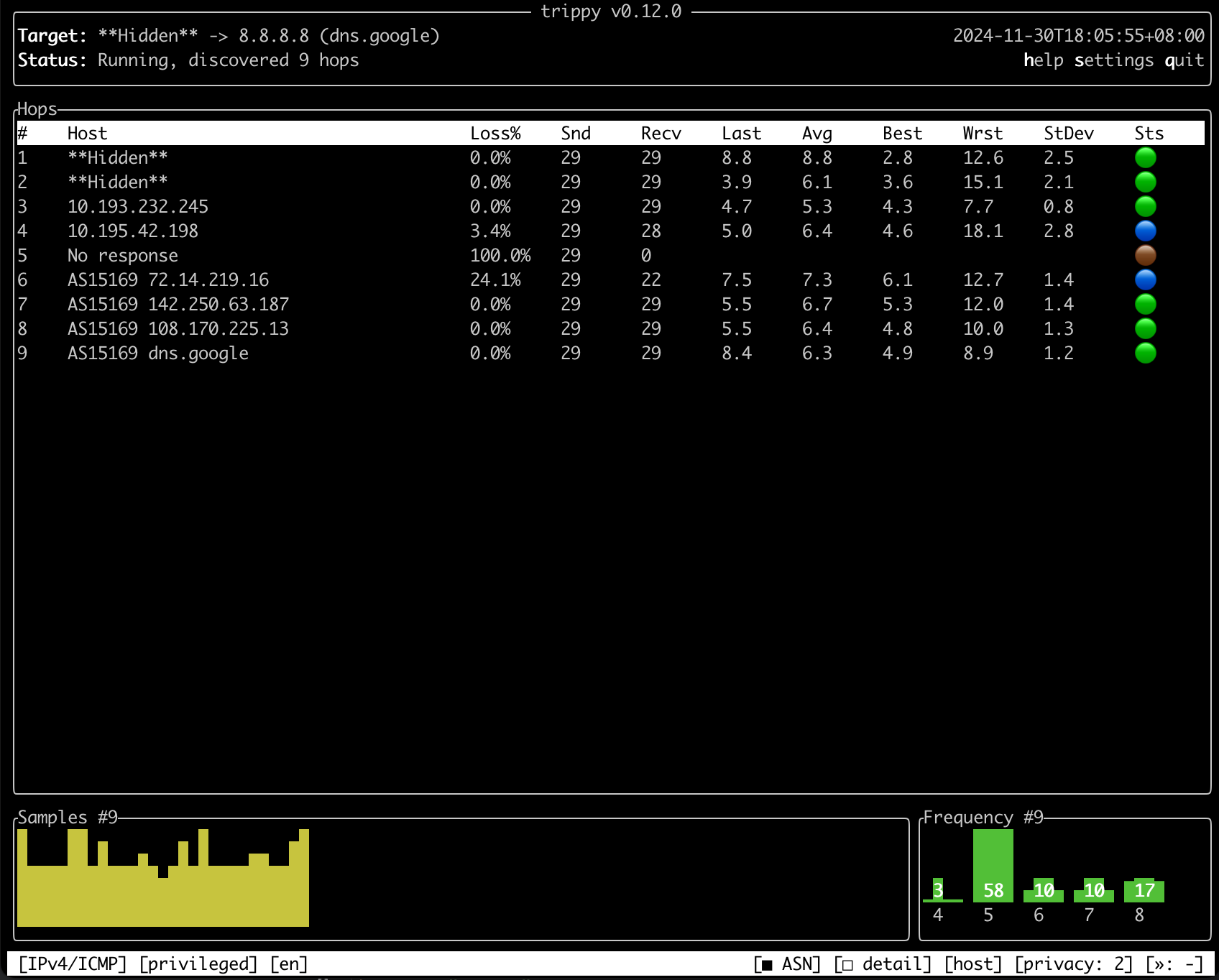
The main TUI screen now appears as shown below (120x40 terminal size):
The left-hand side of the information bar displays a selection of static configuration items (in order):
The address family and tracing protocol, e.g., IPv4/ICMP
The privilege level, either privileged or unprivileged
The locale, e.g., English (en), French (fr), etc.
The right-hand side of the information bar displays a selection of adjustable configuration items (in order):
A toggle controlling whether ASN information is displayed (□ ASN for disabled, ■ ASN for enabled)
A toggle controlling whether hop detail mode is enabled (□ detail for disabled, ■ detail for enabled)
A toggle controlling whether hostnames, IP addresses, or both are displayed (host, ip, or both)
The maximum ttl value for hop privacy, shown as - (privacy disabled) or a number (0, 1, 2, etc.)
The maximum number of hosts displayed per hop, shown as - (automatic) or a number (1, 2, etc.)
In the above screenshot, the information bar indicates the trace is using IPv4/ICMP, is running in privileged mode, the locale is English (en), ASN information is displayed, hop detail mode is disabled, hostnames are displayed, the hop privacy maximum ttl is 2, and the maximum number of hosts per hop is set to automatic.
Note: The information bar displays only a small number of important settings. All other settings can be viewed in
the settings dialog, which can be opened by pressing s (default key binding).
The theme colors of the information bar can be customized using the info-bar-bg-color and info-bar-text-color theme items. Refer to the Theme Reference for more details.
Thanks to @c-git for their valuable feedback in refining the design of the information bar.
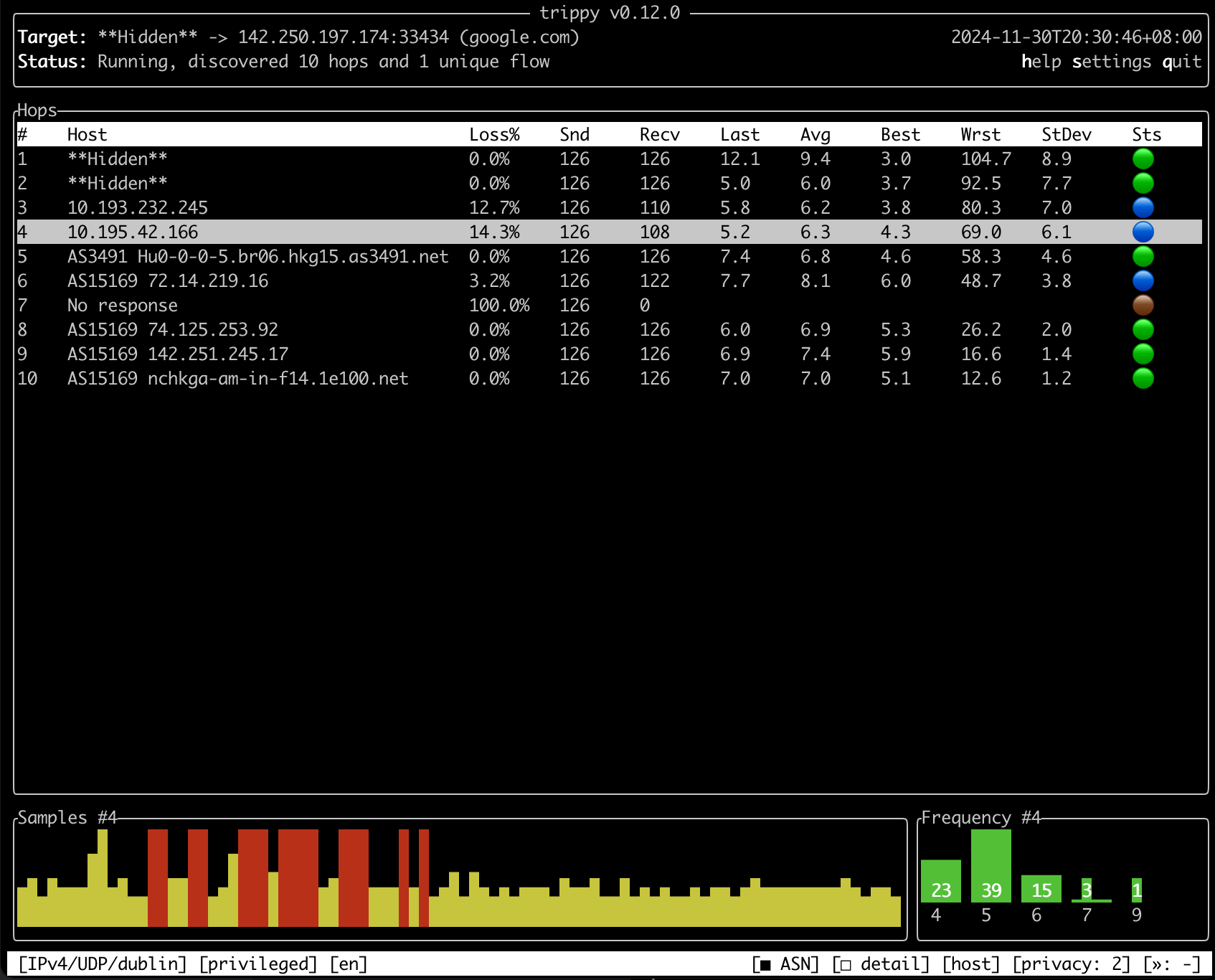
Trippy displays a history of samples for each hop as a chart at the bottom of the TUI display. Each vertical line in the chart corresponds to one sample, representing the value of the Last column.
Previously, if a probe was lost, the sample for that round would be shown as a blank vertical line. Starting with this release, Trippy now highlights lost probes using a full vertical line in red (default theme color), making them easier to identify.
The theme color for regular samples can be configured using the existing samples-chart-color configuration option. Additionally, the theme color for lost probes can now be customized using the new samples-chart-lost-color configuration option. For more details, see the Theme Reference.
This release simplifies the display of the source and target addresses in the Target line in the header of the TUI.
The Target line has been updated such that, for both the source and destination addresses, the hostname is only shown if it differs from the IP address.
For the destination address:
If the user supplies a target hostname, it is resolved to an IP address, and both the IP address and the provided hostname are shown.
If the user supplies an IP address, a reverse DNS hostname lookup is attempted. If successful, both the IP address and the first resolved hostname are shown; otherwise, only the IP address is displayed.
For the source address:
A reverse DNS hostname lookup is attempted. If successful, both the IP address and the first resolved hostname are shown; otherwise, only the IP address is displayed.
For example, when the user supplies an IP address as the tracing target, the Target line in the header is now shown as follows:
Trippy includes a privacy feature designed to hide sensitive information, such as IP addresses and GeoIP data, for all hops up to a configurable maximum ttl via the tui-privacy-max-ttl configuration option.
Previously, the privacy feature could only be toggled on or off within the TUI using the toggle-privacy command and only if tui-privacy-max-ttl was configured before Trippy was started.
In this release, the toggle-privacy command has been deprecated and replaced by two new TUI commands, expand-privacy (bound to the p key by default) and contract-privacy (bound to the o key by default).
The expand-privacy command increases the tui-privacy-max-ttl value up to the maximum number of hops in the current trace and the contract-privacy command decreases the tui-privacy-max-ttl value to the minimum value, which disables privacy mode.
This release also repurposes the meaning of tui-privacy-max-ttl when set to 0. Previously, a value of 0 indicated that no hops should be hidden. Starting from this release, a value of 0 will indicate that the source of the trace, as shown in the Target line of the header, should be hidden.
Values of 1 or greater retain their existing behavior but will now also hide the source of the trace in addition to the specified number of hops.
As a result of this change, the default value for tui-privacy-max-ttl has been updated:
If not explicitly set (via a command-line argument or the configuration file), nothing will be hidden by default.
If explicitly set to 0 (the previous default), the source of the trace will be hidden.
Trippy previously supported the --tui-preserve-screen command-line flag, which could be used to prevent the terminal screen from being cleared when Trippy exits. This feature is useful for users who wish to review trace results after exiting the application. However, the flag had to be set before starting Trippy and could not be toggled during a trace.
This release introduces the quit-preserve-screen TUI command (bound to the shift+q key by default). This command allows users to quit Trippy without clearing the terminal screen, regardless of whether the --tui-preserve-screen flag is set.
The Trippy TUI has been translated into multiple languages. This includes all text displayed in the TUI across all screens and dialogs, as well as GeoIP location data shown on the world map.
The TUI will automatically detect the system locale and use the corresponding translations if available. The locale can be overridden using the --tui-locale configuration option.
Locales can be specified for a language or a combination of language and region. For example a general locale can be created for English (en) and specific regional locales can be created, such as United Kingdom English (en-UK) and United States English (en-US).
If the user's chosen full locale (language-region) is not available, Trippy will fall back to using the locale for the language only, if it exists. For example if the user sets the locale to en-AU, which is not currently defined in Trippy, it will fall back to the en locale, which is defined.
If the user's chosen locale does not exist at all, Trippy will fall back to English (en).
Locales are generally added for the language only unless there is a specific need for region-based translations.
Some caveats to be aware of:
The configuration file, command-line options, and most error messages are not translated.
Many common abbreviated technical terms, such as IPv4 and ASN, are not translated.
The following example sets the TUI locale to be Chinese (zh):
trip example.com --tui-locale zh
This can be made permanent by setting the tui-locale value in the tui section of the configuration file:
[tui]
tui-locale = "zh"
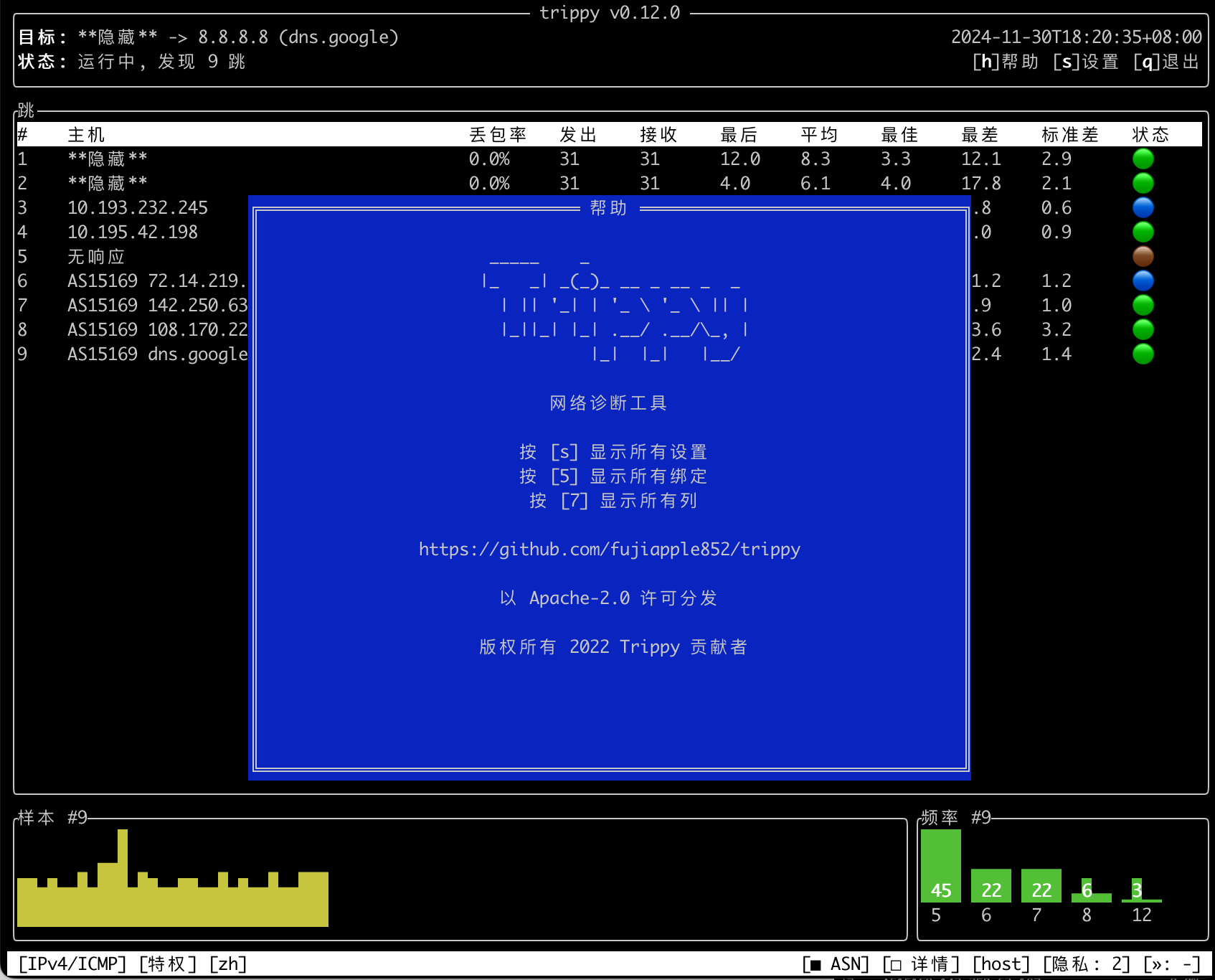
The following screenshot shows the TUI with the locale set to Chinese (zh):
The list of available locales can be printed using the --print-locales flag:
trip --print-locales
As of this release, the following locales are available:
Corrections to existing translations or the addition of new translations are always welcome. See the tracking issue for the status of each translation and details on how to contribute.
Adding these translations has been a significant effort and I would like to express a huge thank you (谢谢! Merci! Danke! Grazie! Obrigado! Спасибо! Gracias! Tack! Teşekkürler!) to @0323pin, @arda-guler, @histrio, @josueBarretogit, @one, @orhun, @peshay, @ricott1, @sxyazi, @ulissesf, and @zarkdav for all of their time and effort adding and reviewing translations for this release.
Forward and Backward Packet Loss Heuristics
In line with most classic traceroute tools, Trippy displays the number of probes sent (Snd), received (Recv), and a loss percentage (Loss%) for each hop. However, many routers are configured to rate-limit or even drop ICMP traffic. This can lead to false positives for packet loss, particularly for intermediate hops, as the lack of a response from such hops does not typically indicate genuine packet loss. This is a common source of confusion for users interpreting trace results.
Trippy already provides a color-coded status column (Sts), that considers both packet loss percentage and whether the hop is the target of the trace, to try and assist users in interpreting the status of each hop. While this feature is helpful, it does not make it clear why a hop has a particular status nor help users interpret the overall status of the trace.
To further assist users, this release of Trippy introduces a pair of novel heuristics to measure forward loss and backward loss. Informally, forward loss indicates whether the loss of a probe is the cause of subsequent losses and backward loss indicates whether the loss of a probe is the result of a prior loss on the path.
More precisely:
forward loss for probe P in round R occurs when probe P is lost in round R and all subsequent probes within round R are also lost.
backward loss for probe P in round R occurs when probe P is lost in round R and any prior probe within round R has forward loss.
These heuristics are encoded in three new columns:
Floss (F): The number of probes with forward loss
Bloss (B): The number of probes with backward loss
Floss% (D): The percentage of probes with forward loss
These columns are hidden by default but can be enabled as needed. For more details, see the Column Reference.
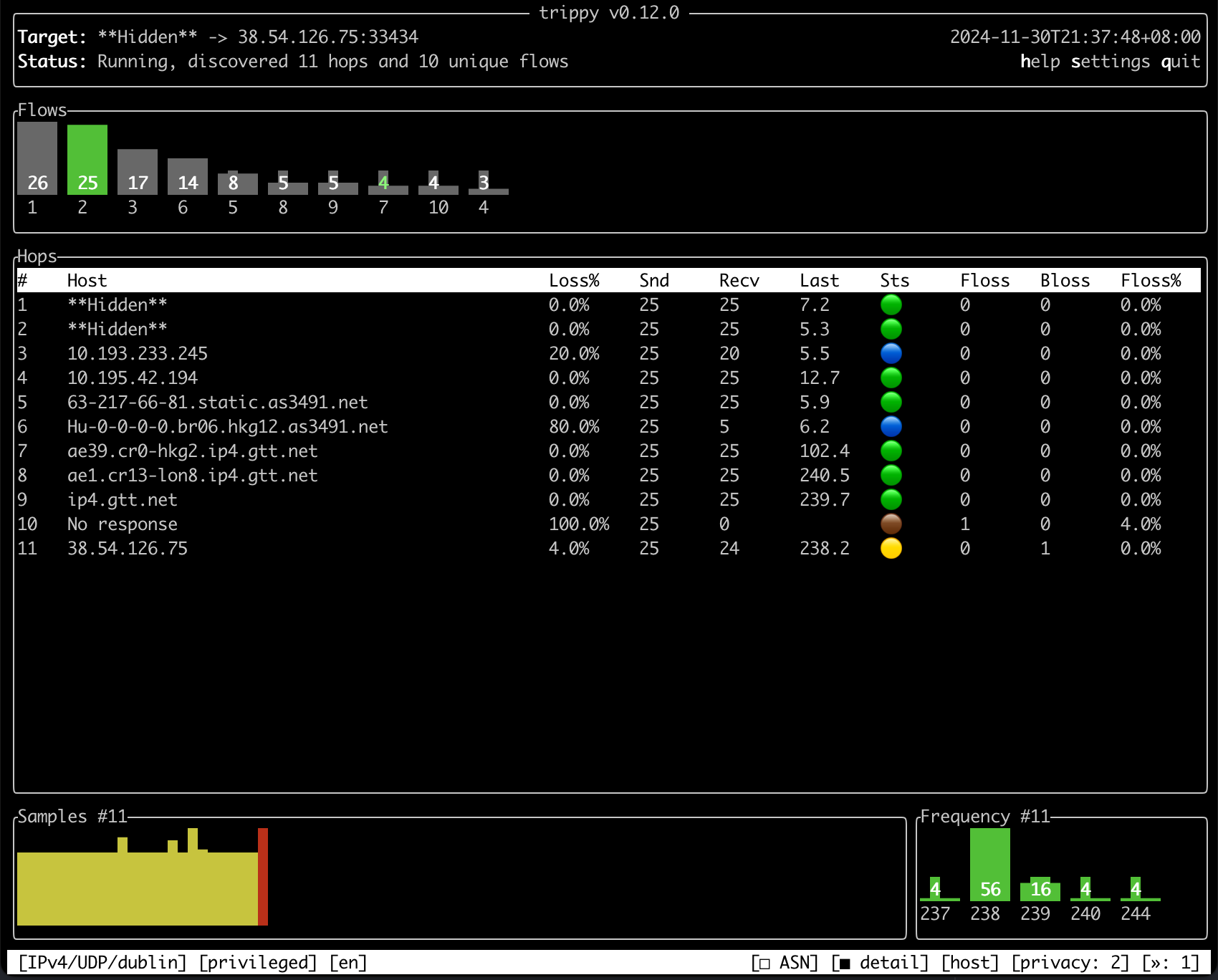
The following screenshot shows an example trace with the new columns enabled:
In the following (contrived) example, after initially discovering the target (10.0.0.105) during the first round, genuine packet loss occurs in all subsequent rounds at the third hop. This means that no probes on the common path are able to get beyond the third hop.
From this we can determine that the loss at the third hop is classified as forward loss because all subsequent probes (4th and 5th) in the same round are also lost. We can also conclude that the 4th and 5th hops have backward loss starting from round two, as in those rounds a prior hop (the third hop) has forward loss.
Note the difference between the traditional Loss% column and the new Floss% column. The Loss% column indicates packet loss at several hops (3rd, 4th, and 5th). In contrast, the Floss% column helps us determine that the true packet loss most likely occurs at the 3rd hop.
It is important to stress that this technique is a heuristic, and both false positives and false negatives are possible. Some specific caveats to be aware of include:
Every probe sent in every round is an independent trial, meaning there is no guarantee that all probes within a given round will follow the same path (or "flow"). The concept of "forward loss" and "backward loss" assumes that all probes followed a single path. This assumption is typically met (but not guaranteed) when using tracing strategies such as ICMP, UDP/Dublin, or UDP/Paris.
Any given host on the path may drop packets for only a subset of probes sent within a round, either due to rate limiting or genuine intermittent packet loss. This could result in a false positive for "forward loss" at a given hop if all subsequent hops in the round exhibit packet loss that is not genuine. For example, in the scenario above, the hop with ttl=3 could be incorrectly deemed to have "forward loss" if observed loss from hops ttl=4 and ttl=5 is not genuine (e.g., caused by rate-limiting).
A false positive for "backward loss" could occur at a hop experiencing genuine packet loss if a previous hop on the path has "forward loss" that is not genuine. In the scenario above, if the hop with ttl=4 has genuine packet loss, it will still be marked with "backward loss" due to the "forward loss" at ttl=3.
Despite these caveats, the addition of forward loss and backward loss heuristics aims to help users more accurately interpret trace outputs. However, these heuristics should be considered experimental and may be subject to change in future releases.
The previous release of Trippy introduced a bug (#1290) that caused reverse DNS lookups to be enqueued multiple times when the dns-ttl expired, potentially leading to the hostname being displayed as Timeout: xxx for a brief period.
A long standing bug (#1398) which caused the TUI sample history and frequency charts to ignore sub-millisecond samples has been fixed.
This release fixes a bug (#1287) that caused the tracer to panic when parsing certain ICMP extensions with malformed lengths.
It also resolves an issue (#1289) where the ICMP extensions mode was not being displayed in the TUI settings dialog.
A bug (#1375) that caused the cursor to not move to the bottom of the screen when exiting while preserving the screen has also been fixed.
Finally, this release fixes a bug (#1327) that caused Trippy to incorrectly reject the value ip for the tui-address-mode configuration option (thanks to @c-git).
New Distribution Packages
Trippy is now available in Debian 13 (trixie) and later (with thanks to @nc7s!).